لمناسبة واحدة، ببساطة.One occasion. Less setup.
ورش، حفلات زواج وفعاليات صغيرة: دعوات وتسجيل وقوائم ضيوف ومساعدة عملية.Workshops, weddings and small events: invitations, registration, guest lists and practical support.

افتح رابط الوصول الذي شاركه معك فريق ريزي.Open the access link shared with you by the Rizi team.
غرفة البياناتData roomريزي · للفعاليات وما بعدهاRizi · Events and what comes after
منصة تدير بها فعاليتك، وفريق يتولاها بالنيابة عنك عندما تحتاجه.Software to run your event. A team to handle it when you need one.
نبني ريزي للمنظّمين في السعودية والخليج: تطبيقات متصلة، تجربة عربية أولاً، ودعم يناسب فعالية واحدة أو برنامج فعاليات متكامل.Built for organizers in Saudi Arabia and the GCC: connected apps, an Arabic-first experience, and support for a single occasion or a full event program.
دعوات في أداة، وقوائم ضيوف في أخرى، وفريق استقبال يحاول جمع التفاصيل. ريزي تربط هذه الأجزاء: صفحة الفعالية، التسجيل، الضيوف، الدخول، ثم المتابعة.Invitations in one tool, guest lists in another, and a reception team piecing it all together. Rizi connects the event page, registration, guests, access and follow-up.
لكن العملاء لم يطلبوا البرنامج فقط.Customers asked for more than software.
بعضهم يريد تدريب موظفيه. بعضهم يحتاج تشغيل فعالية واحدة. وآخرون يريدون تفويض العمل كاملاً. من هنا تطورت مسارات ريزي.Some need staff training. Some need help with one event. Others want the whole job handled. Those requests shaped Rizi’s service paths.
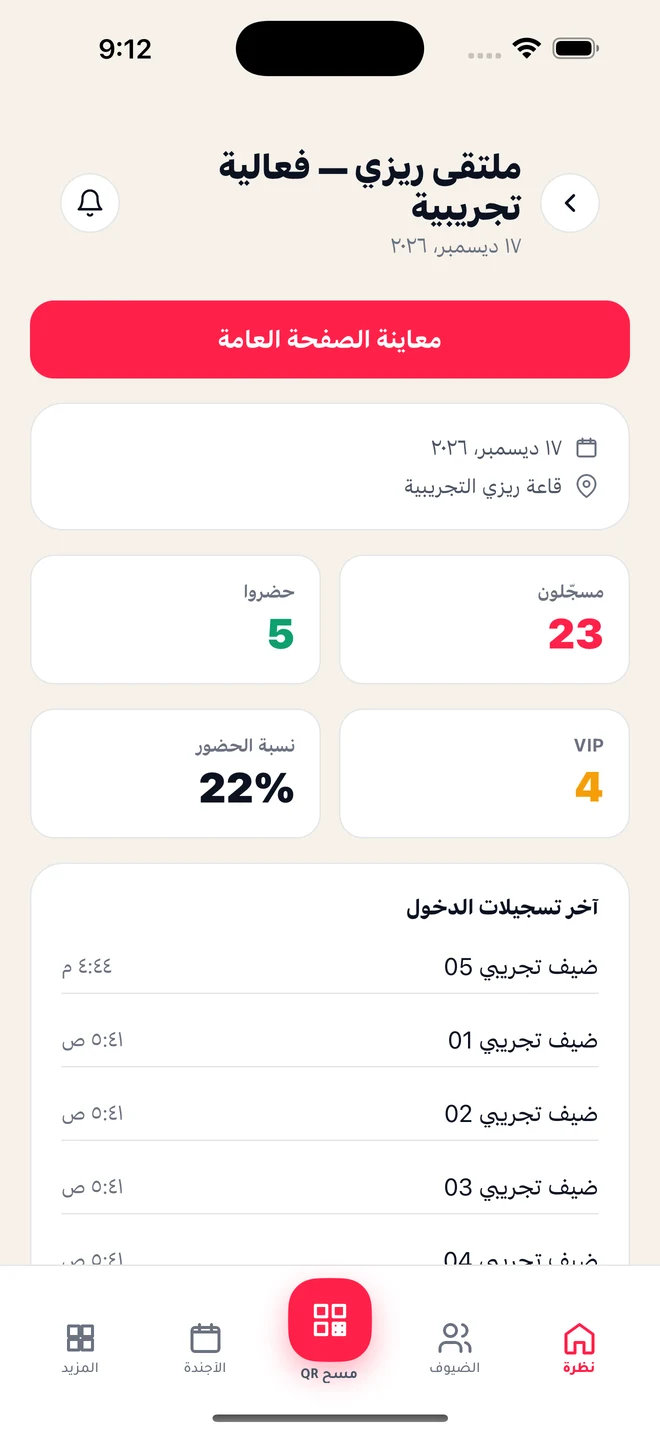
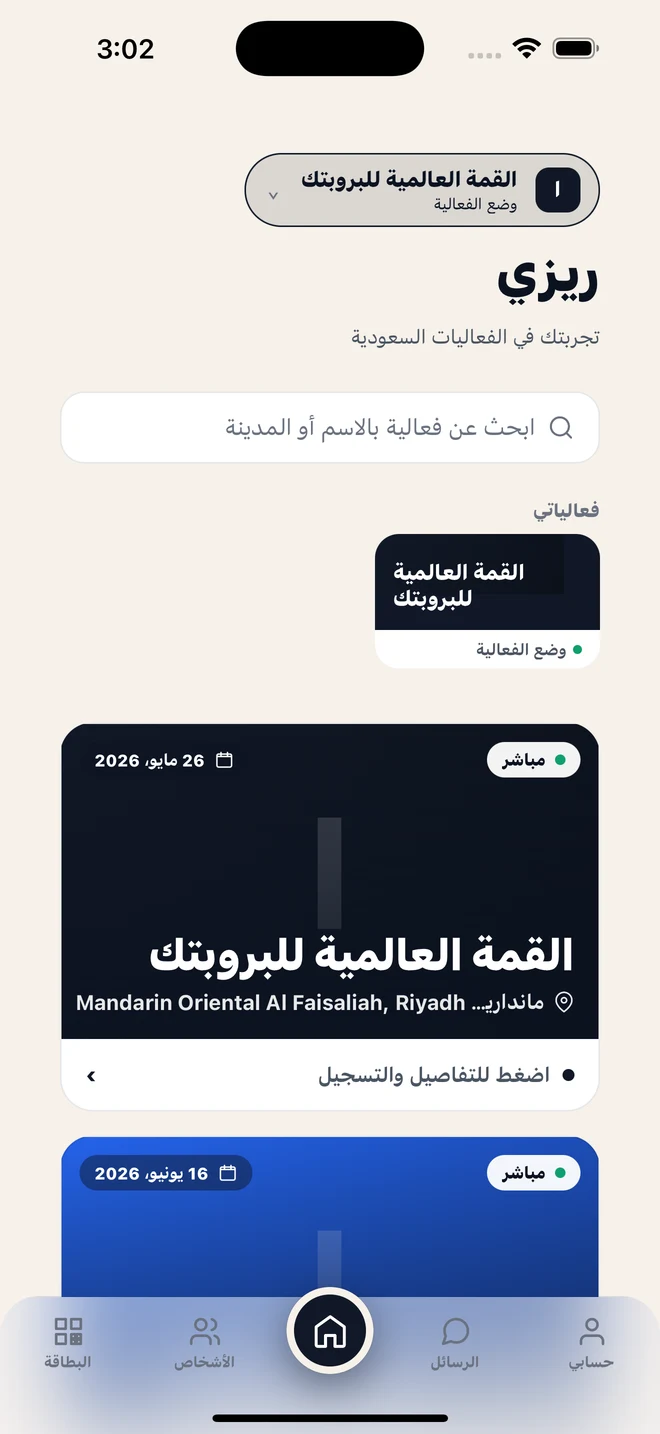
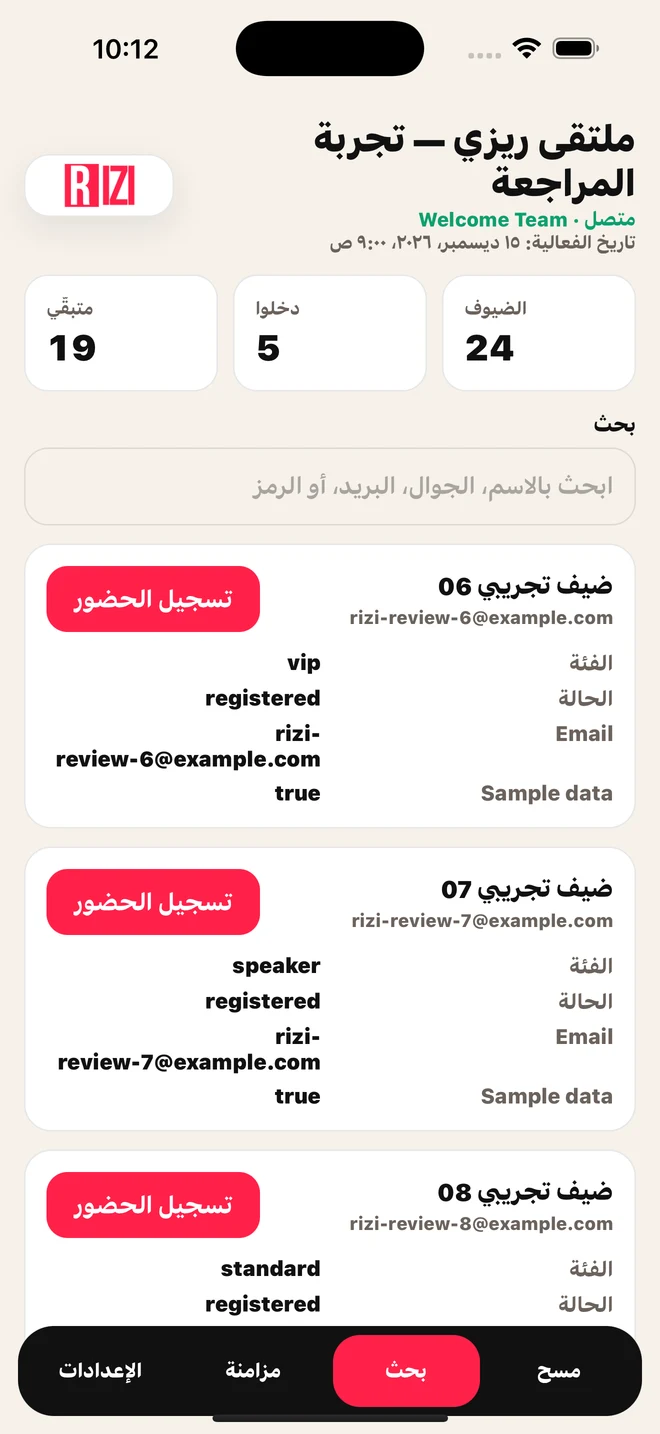
لكل شخص في الفعالية، مساحة عمله.A dedicated experience for each person at the event.

تابع التسجيلات والضيوف والحضور، وابقَ قريباً من تفاصيل الفعالية أثناء تشغيلها.Monitor registrations, guests and attendance while your event is running.
لقطات فعلية من حزمة مراجعة التطبيق. الأرقام المعروضة بيانات تجريبية وليست مؤشرات أداء للشركة.Actual screenshots from the app review package. Screen figures are demo data, not company performance metrics.
زيارة ريزيVisit Rizi
اكتشاف الفعاليات والتفاصيل والبطاقة الرقمية، ضمن تجربة مصممة للمشاركة.Event discovery, event details and digital passes in an experience built for participation.
لقطات فعلية من حزمة مراجعة التطبيق. الأرقام المعروضة بيانات تجريبية وليست مؤشرات أداء للشركة.Actual screenshots from the app review package. Screen figures are demo data, not company performance metrics.
زيارة ريزيVisit Rizi
قوائم ضيوف وبحث ومسح QR لتنسيق الدخول ومتابعة الحضور في الميدان.Guest lists, search and QR scanning for coordinated access and on-site attendance.
لقطات فعلية من حزمة مراجعة التطبيق. الأرقام المعروضة بيانات تجريبية وليست مؤشرات أداء للشركة.Actual screenshots from the app review package. Screen figures are demo data, not company performance metrics.
زيارة ريزيVisit Riziالويب وRizi Studio هما نقطة انطلاق المنظّم.The web platform and Rizi Studio are the organizer’s starting point.
صفحات الفعاليات، الهوية، البرنامج والمتحدثون.Event pages, branding, agendas and speakers.
التسجيل، الدعوات، قوائم الضيوف وQR.Registration, invitations, guest lists and QR.
أدوات التسويق، التحليلات، جهات الاتصال وعلاقات CRM.Outreach tools, analytics, contacts and CRM relationships.
جمع العملاء المحتملين وتأهيلهم ومتابعتهم.Capture, qualify and follow up with exhibitor leads.
التكاملات والتوسّع في الوحدات ضمن مسار التطوير؛ تُراجع إتاحة كل ميزة بحسب المنتج ونطاق العمل.Integrations and broader modules remain part of product development; availability is checked by product and scope.
ورش، حفلات زواج وفعاليات صغيرة: دعوات وتسجيل وقوائم ضيوف ومساعدة عملية.Workshops, weddings and small events: invitations, registration, guest lists and practical support.
إدارة ذاتية للمنظّمين والفرق التي تحتاج أدوات تشغيل قابلة للاستخدام عبر فعاليات متعددة.Self-service operations for organizers and teams managing multiple events.
نطاق يختاره العميل، وفريق يتولى التنفيذ. يمكن الاتفاق على فعالية واحدة فقط.An agreed scope with a team to deliver it. Available around a single event.
ELITE / WHITE GLOVEحدد ما تريد تفويضه، ودع ريزي تتولى التفاصيل. من تصميم الدعوة إلى استقبال ضيوفك والتقرير النهائي.Choose what you want to delegate. Rizi handles the details, from invitations to welcoming guests and final reporting.

هوية الفعالية، الدعوات وتجهيز قوائم الضيوف.Event identity, invitations and guest-list preparation.
بدأت ريزي تستقبل اتصالات وطلبات من محركات البحث، دون إطلاق حملة مدفوعة.Rizi has started receiving inbound calls and leads from search engines without running a paid campaign.
ملاحظة نوعية من المؤسس؛ لا تمثل أرقاماً موثّقة للتحويل أو الإيرادات.Founder-observed qualitative traction; no verified conversion or revenue figures are claimed.
طبقة التأهيل والتوصية: نبدأ من احتياج العميل ثم نوجّه الطلب إلى المسار المناسب.The qualification and recommendation layer: understand the need, then route each inquiry to the right service.
النوع، التاريخ، الموقع، عدد الضيوف، وهل تتكرر؟Type, date, location, guest count, one-off or recurring?
تدريب، فريق ميداني، تسجيل، دعوات، QR أو تسويق.Training, on-site support, registration, invitations, QR or marketing.
Simple / Platform / Elite أو تدريب ونطاق مخصص.or training and custom scope.
التأهيل والتوجيه الآلي الأعمق ضمن مسار التطوير.Deeper automated qualification and routing are on the roadmap.
الضيوف وبيانات التسجيل والحقول المخصصة؛ أساس تجربة الحضور.Guests, registration data and custom fields form the attendance record.
مسح الشارة، أسئلة التأهيل، الملاحظات والتقييم وحالة المتابعة.Badge scans, qualification answers, notes, ratings and follow-up status.
شركات وجهات اتصال ورعاة وشركاء وأنشطة ومهام وفرص مترابطة.Companies, contacts, sponsors, partners, activities, tasks and opportunities.
التسعير بحسب نطاق العمل. لا توجد أسعار نهائية منشورة في هذا الملف.Pricing is scope-based. This dossier does not publish final prices.
| العميلCustomer | الاحتياجNeed | المسار المقترحSuggested path |
|---|---|---|
| ورشة أو زواجWedding or workshop | تجهيز بسيط لمناسبة واحدةSimple one-time setup | Rizi Simple |
| مؤتمر أو فعالية لمرة واحدةOne-time conference or event | تشغيل متكامل حسب النطاقFull workflow within an agreed scope | Rizi Elite |
| منظّم فعاليات متكررةRecurring event organizer | إدارة ذاتية لفريق المنظّمSelf-service event operations | Rizi Platform |
| جهة لديها فريق داخليClient with an internal team | تدريب وتمكين الفريقStaff training and enablement | باقة تدريبTraining |
| معرض أو فعالية رعاةExhibition or sponsor-led event | بيانات عارضين وعلاقات قابلة للمتابعةExhibitor leads and follow-up | Exhibitor + CRM |
| فعالية مؤسسية أو دبلوماسيةEnterprise or diplomatic event | عمليات ثنائية اللغة ونطاق مخصصBilingual operations and custom delivery | بالنيابة عني + نطاق مخصصWhite Glove + custom scope |
صفحات الفعاليات والتسجيل والضيوف وQR والدخول، وتطبيقات المنظّم والزائر والدخول، وواجهات العارضين وعلاقات CRM.Event pages, registration, guests, QR and check-in; organizer, visitor and door apps; exhibitor and CRM surfaces.
توضح لقطات التطبيقات تجربة المراجعة. لا يعني عرضها اعتماد التطبيقات في المتجر.App screenshots show review builds; their inclusion does not claim App Store approval.
تأهيل أدق عبر Rizi Planner، تكاملات ووحدات أوسع، وباقات تدريب وأدلة تشغيل قابلة للتكرار لخدمة الفعالية الواحدة.Deeper Rizi Planner qualification, broader modules and integrations, and repeatable training and operating playbooks for single-event delivery.
نبني المنتج ونطوّر طريقة تقديمه للعملاء.Building the product and how it is delivered to customers.
الأرشيف الأصلي للمرحلة الأكاديمية، بما فيه نطاق MVP والواجهات والمخططات. هذا النطاق التاريخي منفصل عن عرض الخدمات الحالي.The original academic-stage archive, including the MVP scope, APIs and diagrams. That historical scope is separate from today’s service offering.
Section
RiziEvents is a reduced MVP for event publishing and registration. The documented product scope is intentionally limited to the features needed for a phase-three academic review and for a small four-member student team.
The platform allows an organizer to sign in, create an event, publish it under a slug-based public URL, accept guest registrations, and manage offline check-in at the venue. The official MVP architecture uses Next.js on Vercel for the web application and Supabase for authentication, database, and backend platform services.
https://www.rizi.apphttps://rizi.apphttps://staging.rizi.apphttps://www.rizi.app/e/[slug]Primary visual system for the MVP: Rizi red, near-black contrast, green support accent, Plus Jakarta Sans for English, and Thmanyah for Arabic.
Mockups and user-story drafts were completed earlier by the team and are reused as the visual basis for this submission. The expected main screens covered by those mockups are:
The organizer journey mockup currently covers the organizer-side flow for sign in, dashboard access, event creation and editing, publication readiness, and organizer event management.
Direct Figma embed link:
https://embed.figma.com/design/RmJ2tLT6Nm2U7oc9pciS2j/Rizi-Final-Mockup?node-id=15-259&embed-host=share
The visitor journey mockup currently covers the guest-facing flow for opening the event page, reviewing the public event details, and completing the registration journey.
Direct Figma embed link:
https://embed.figma.com/design/RmJ2tLT6Nm2U7oc9pciS2j/Rizi-Final-Mockup?node-id=4-2111&embed-host=share
This repository focuses on the technical documentation and architecture that align with those mockups.
The high-level architecture is documented in the GitHub repository: system-architecture.mmd
GitHub-rendered diagrams are also collected here: docs/diagrams.md
flowchart LR
    Guest["Guest User"] --> Browser["Web Browser"]
    Organizer["Organizer"] --> Browser

    Browser --> Vercel["Vercel / Next.js Web App"]
    Vercel --> Auth["Supabase Auth"]
    Vercel --> DB["Supabase Postgres"]
    Vercel --> Storage["Supabase Storage"]
    Vercel --> Maps["Google Maps API and Places SDK"]

    Auth --> DB
    DB --> RLS["Row Level Security Policies"]

    subgraph Environments
      Prod["Production: www.rizi.app"]
      Stage["Staging: staging.rizi.app"]
    end

    Prod -. deploy .-> Vercel
Stage -. validate .-> VercelThe class and component relationships are documented in the GitHub repository: class-diagram.mmd
Auth UIEvent Management UIPublic Event Pagehttps://www.rizi.app/e/[slug].Guest Registration UIGuest List UIOffline Check-in UIAuthServiceregisterOrganizer(), loginOrganizer(), getCurrentOrganizer().EventServicecreateEvent(), updateEvent(), publishEvent(), getPublicEventBySlug().GuestServiceregisterGuest(), listGuestsByEvent(), getGuestById().VenueLocationServicesaveVenueLocation(), buildDirectionsUrl().CheckInServicecheckInGuest(), getAttendanceStatus().classDiagram
class AuthUI {
+renderLoginForm()
+renderRegisterForm()
+submitCredentials()
}
class EventManagementUI {
+renderEventForm()
+saveDraft()
+publishEvent()
+viewGuestList()
}
class PublicEventPage {
+loadEventBySlug()
+renderEventDetails()
+showVenueDirections()
}
class GuestRegistrationUI {
+renderRegistrationForm()
+submitRegistration()
+showConfirmation()
}
class GuestListUI {
+renderGuestList()
+filterGuests()
+openCheckInScreen()
}
class OfflineCheckInUI {
+searchGuest()
+confirmCheckIn()
+showAttendanceStatus()
}
class AuthService {
+registerOrganizer()
+loginOrganizer()
+getCurrentOrganizer()
}
class EventService {
+createEvent()
+updateEvent()
+publishEvent()
+getPublicEventBySlug()
}
class GuestService {
+registerGuest()
+listGuestsByEvent()
+getGuestById()
}
class VenueLocationService {
+saveVenueLocation()
+buildDirectionsUrl()
+mapPlaceToVenueFields()
}
class CheckInService {
+checkInGuest()
+getAttendanceStatus()
+preventDuplicateCheckIn()
}
class User {
+uuid id
+string email
+string name
+string role
}
class Event {
+uuid id
+uuid organizerId
+string slug
+string title
+string status
+int capacity
+string placeId
+float latitude
+float longitude
}
class Guest {
+uuid id
+uuid eventId
+string fullName
+string email
+string phone
+string tier
+string status
+datetime checkedInAt
}
class AgendaItem {
+uuid id
+uuid eventId
+uuid speakerId
+string title
+datetime startTime
+datetime endTime
}
class Speaker {
+uuid id
+uuid eventId
+string fullName
+string jobTitle
+string bio
}
AuthUI --> AuthService : uses
EventManagementUI --> EventService : uses
EventManagementUI --> GuestService : reads guests
PublicEventPage --> EventService : loads event
PublicEventPage --> VenueLocationService : gets map data
GuestRegistrationUI --> GuestService : registers guest
GuestListUI --> GuestService : lists guests
OfflineCheckInUI --> CheckInService : checks in guest
CheckInService --> GuestService : reads guest
User "1" --> "many" Event : creates
Event "1" --> "many" Guest : contains
Event "1" --> "many" AgendaItem : schedules
Event "1" --> "many" Speaker : features
Speaker "0..1" --> "many" AgendaItem : presentsThe ER diagram is documented in the GitHub repository: database-er.mmd
userseventsguestsagenda_itemsspeakershttps://www.rizi.app/e/[slug].place_id, address, latitude, and longitude.erDiagram
USERS ||--o{ EVENTS : creates
EVENTS ||--o{ GUESTS : registers
EVENTS ||--o{ AGENDA_ITEMS : includes
EVENTS ||--o{ SPEAKERS : features
SPEAKERS o|--o{ AGENDA_ITEMS : may_present
USERS {
uuid id PK
string email
string name
string role
datetime created_at
}
EVENTS {
uuid id PK
uuid organizer_id FK
string slug
string title
string status
datetime start_date
datetime end_date
string venue_name
string venue_address
string city
string place_id
float latitude
float longitude
int capacity
json brand_config
datetime created_at
}
GUESTS {
uuid id PK
uuid event_id FK
string full_name
string email
string phone
string tier
string status
datetime checked_in_at
datetime created_at
}
AGENDA_ITEMS {
uuid id PK
uuid event_id FK
uuid speaker_id FK
string title
string item_type
datetime start_time
datetime end_time
string location_name
}
SPEAKERS {
uuid id PK
uuid event_id FK
string full_name
string job_title
string bio
}The key interaction diagrams are stored in the GitHub repository:
Together, the sequence diagrams cover the full MVP flow from organizer authentication to event publishing, guest registration, guest list retrieval, and offline check-in. The create/publish and guest-registration sequences also cover the Should Have stories around agenda, speakers, and venue directions at the level expected for this MVP.
sequenceDiagram
    actor Organizer
    participant UI as Auth UI
    participant API as AuthService
    participant Auth as Supabase Auth
    participant DB as Supabase Postgres

    Organizer->>UI: Open sign up or sign in screen
    alt New organizer registration
        Organizer->>UI: Submit register form
        UI->>API: POST /api/auth/register
        API->>Auth: Create auth account
        Auth->>DB: Create organizer profile record
        DB-->>Auth: Profile saved
        Auth-->>API: Account created
        API-->>UI: Registration success
    else Existing organizer login
        Organizer->>UI: Submit login form
        UI->>API: POST /api/auth/login
        API->>Auth: Validate credentials
        Auth-->>API: Session returned
        API-->>UI: Authenticated session
endsequenceDiagram
actor Organizer
participant UI as Event Management UI
participant API as EventService
participant Maps as VenueLocationService
participant DB as Supabase Postgres
Organizer->>UI: Open create event form
Organizer->>UI: Enter title, dates, capacity, branding
Organizer->>UI: Search venue
UI->>Maps: Resolve place data from Google Maps
Maps-->>UI: place_id, address, latitude, longitude
Organizer->>UI: Save draft
UI->>API: POST /api/events
API->>DB: Insert draft event with slug and venue data
DB-->>API: Event created
API-->>UI: Draft event response
Organizer->>UI: Add optional agenda and speakers
UI->>API: PATCH /api/events/{eventId}
API->>DB: Update event content
DB-->>API: Event updated
API-->>UI: Updated event response
Organizer->>UI: Publish event
UI->>API: POST /api/events/{eventId}/publish
API->>DB: Update event status to published
DB-->>API: Published event
API-->>UI: Public URL returnedsequenceDiagram
actor Guest
participant UI as Public Event Page
participant API as GuestService
participant Maps as VenueLocationService
participant DB as Supabase Postgres
Guest->>UI: Open /e/{slug}
UI->>API: GET /api/public/events/{slug}
API->>DB: Read published event by slug
DB-->>API: Event details, agenda, speakers, venue
API-->>UI: Event page payload
UI->>Maps: Build directions link from venue data
Maps-->>UI: Directions URL
Guest->>UI: Review details and submit registration form
UI->>API: POST /api/guests/register
API->>DB: Validate event and create guest
DB-->>API: Guest record created
API-->>UI: Registration success response
UI-->>Guest: Confirmation shownsequenceDiagram
actor Organizer
participant UI as Guest List and Check-in UI
participant GuestAPI as GuestService
participant API as CheckInService
participant DB as Supabase Postgres
Organizer->>UI: Open guest list
UI->>GuestAPI: GET /api/events/{eventId}/guests
GuestAPI->>DB: Fetch registered guests
DB-->>GuestAPI: Guest list
GuestAPI-->>UI: Guest list response
Organizer->>UI: Search guest and confirm check-in
UI->>API: POST /api/guests/{guestId}/checkin
API->>DB: Update guest status and checked_in_at
DB-->>API: Updated guest
API-->>UI: Check-in success response
UI-->>Organizer: Attendance updatedThe detailed endpoint definitions are documented in docs/api-spec.md.
POST /api/auth/registerPOST /api/auth/loginPOST /api/eventsGET /api/eventsGET /api/events/{eventId}PATCH /api/events/{eventId}POST /api/events/{eventId}/publishGET /api/public/events/{slug}POST /api/guests/registerGET /api/events/{eventId}/guestsPOST /api/guests/{guestId}/checkinThe full plan is documented in docs/scm-qa-plan.md.
main is the protected branch.The full rationale is documented in docs/technical-justifications.md.
.docx submission file is generated from the repo content and ready to upload.Section
https://www.rizi.apphttps://rizi.apphttps://staging.rizi.apphttps://www.rizi.app/e/{slug}place_id, address, latitude, and longitudeapplication/json{
"error": {
"code": "VALIDATION_ERROR",
"message": "The event title is required."
}
}POST /api/auth/register{
"name": "Tariq Rashid",
"email": "tariq@example.com",
"password": "StrongPassword123!"
}Status: 201 Created
{
  "userId": "5b1a9b62-5c42-4e53-a93b-0cb81d0a28d1",
  "email": "tariq@example.com",
  "createdAt": "2026-04-25T14:40:00Z"
}201 Created account created400 Bad Request invalid payload409 Conflict email already existsPOST /api/auth/login{
"email": "tariq@example.com",
"password": "StrongPassword123!"
}Status: 200 OK
{
  "accessToken": "session-or-jwt-token",
  "user": {
    "id": "5b1a9b62-5c42-4e53-a93b-0cb81d0a28d1",
    "name": "Tariq Rashid",
    "email": "tariq@example.com"
  }
}200 OK authenticated400 Bad Request missing credentials401 Unauthorized invalid email or passwordPOST /api/events{
"title": "Health Exhibition 2026",
"description": "A focused health and innovation exhibition for students and startups.",
"startDate": "2026-06-12T10:00:00Z",
"endDate": "2026-06-12T18:00:00Z",
"venue": {
"name": "Riyadh Front Hall A",
"address": "Riyadh Front, Riyadh, Saudi Arabia",
"city": "Riyadh",
"placeId": "ChIJExamplePlaceId123",
"latitude": 24.7786,
"longitude": 46.7386
},
"capacity": 500,
"brandConfig": {
"primaryColor": "#0F766E"
}
}Status: 201 Created
{
  "eventId": "a9bc6b0d-e06d-49c9-944a-1fc0d9ec7e37",
  "slug": "health-exhibition-2026",
  "status": "draft"
}201 Created event draft created400 Bad Request invalid payload401 Unauthorized organizer not authenticatedGET /api/eventsstatuspagepageSizeGET /api/events?status=published&page=1&pageSize=10
Status: 200 OK
{
  "items": [
    {
      "id": "a9bc6b0d-e06d-49c9-944a-1fc0d9ec7e37",
      "title": "Health Exhibition 2026",
      "slug": "health-exhibition-2026",
      "status": "published"
    }
  ],
  "total": 1
}200 OK events returned401 Unauthorized organizer not authenticatedGET /api/events/{eventId}Status: 200 OK
{
  "id": "a9bc6b0d-e06d-49c9-944a-1fc0d9ec7e37",
  "slug": "health-exhibition-2026",
  "title": "Health Exhibition 2026",
  "status": "draft",
  "venue": {
    "name": "Riyadh Front Hall A",
    "city": "Riyadh"
  },
  "capacity": 500,
  "guestCounts": {
    "registered": 0,
    "checkedIn": 0
  }
}200 OK event found401 Unauthorized organizer not authenticated404 Not Found event not found or not owned by organizerPATCH /api/events/{eventId}{
"description": "Updated event description.",
"agenda": [
{
"title": "Opening Session",
"startTime": "2026-06-12T10:30:00Z",
"endTime": "2026-06-12T11:00:00Z"
}
],
"speakers": [
{
"fullName": "Dr. Noura Al-Harbi",
"jobTitle": "Healthcare Innovation Lead"
}
]
}Status: 200 OK
{
  "id": "a9bc6b0d-e06d-49c9-944a-1fc0d9ec7e37",
  "updatedAt": "2026-04-25T15:20:00Z",
  "status": "draft"
}200 OK event updated400 Bad Request invalid payload401 Unauthorized organizer not authenticated404 Not Found event not foundPOST /api/events/{eventId}/publishStatus: 200 OK
{
  "id": "a9bc6b0d-e06d-49c9-944a-1fc0d9ec7e37",
  "slug": "health-exhibition-2026",
  "status": "published",
  "publicUrl": "https://www.rizi.app/e/health-exhibition-2026"
}200 OK event published400 Bad Request event missing required publish fields401 Unauthorized organizer not authenticated404 Not Found event not foundGET /api/public/events/{slug}/e/{slug}Status: 200 OK
{
  "slug": "health-exhibition-2026",
  "title": "Health Exhibition 2026",
  "description": "A focused health and innovation exhibition for students and startups.",
  "startDate": "2026-06-12T10:00:00Z",
  "endDate": "2026-06-12T18:00:00Z",
  "venue": {
    "name": "Riyadh Front Hall A",
    "address": "Riyadh Front, Riyadh, Saudi Arabia",
    "city": "Riyadh",
    "directionsUrl": "https://maps.google.com/..."
  },
  "agenda": [],
  "speakers": [],
  "registrationOpen": true
}200 OK event returned404 Not Found slug not found or event not publishedPOST /api/guests/register{
"eventId": "a9bc6b0d-e06d-49c9-944a-1fc0d9ec7e37",
"fullName": "Sara Ahmed",
"email": "sara@example.com",
"phone": "+966500000000"
}Status: 201 Created
{
  "guestId": "c06828fc-bf5c-450f-bb4f-3e40cad1fc25",
  "status": "registered",
  "message": "Registration completed successfully."
}201 Created guest registered400 Bad Request invalid payload404 Not Found event not found409 Conflict duplicate registration detectedGET /api/events/{eventId}/guestssearchstatuspagepageSizeGET /api/events/{eventId}/guests?search=sara&status=registered&page=1&pageSize=25
Status: 200 OK
{
  "items": [
    {
      "guestId": "c06828fc-bf5c-450f-bb4f-3e40cad1fc25",
      "fullName": "Sara Ahmed",
      "email": "sara@example.com",
      "status": "registered",
      "checkedInAt": null
    }
  ],
  "total": 1,
  "counts": {
    "registered": 1,
    "checkedIn": 0
  }
}200 OK guest list returned401 Unauthorized organizer not authenticated404 Not Found event not foundPOST /api/guests/{guestId}/checkinStatus: 200 OK
{
  "guestId": "c06828fc-bf5c-450f-bb4f-3e40cad1fc25",
  "status": "checked_in",
  "checkedInAt": "2026-06-12T09:58:00Z"
}200 OK guest checked in401 Unauthorized organizer not authenticated404 Not Found guest not found409 Conflict guest already checked inThe reduced MVP intentionally excludes:
Section
main is the protected branch and represents the stable project state.feature/event-publish-flow or docs/api-spec.hotfix/* branch if a production issue appears.main.Add guest registration API spec or Update reduced MVP architecture diagram.https://www.rizi.apphttps://staging.rizi.app.docx is generated and readable.Section
Supabase is justified for this MVP because it reduces backend setup time while still providing the core services required by the product. The team needs authentication, a relational database, and practical access control without spending the project budget and schedule on custom infrastructure.
Vercel is justified because the documented frontend is based on Next.js and the team needs fast deployment, preview capability, and a simple path for staging and production environments.
Google Maps is justified as the only core external integration in the MVP because event products depend on clear venue information. The team needs a reliable way to let organizers choose a location and help guests navigate to it.
The project intentionally excludes online payment gateways from the MVP. This is a scope-control decision, not a product limitation statement for the long term.
The original product direction explored more advanced platform ideas, but the reduced MVP is the correct technical choice for this phase.
The documentation standardizes on https://www.rizi.app/e/[slug] instead of custom domains or subdomains.
The formal technical documentation does not present AI assistance as a core MVP system feature.
Section
This page collects every Mermaid diagram used in the reduced MVP documentation so GitHub can render them in one place.
| User Story | Diagram Coverage |
|---|---|
| Organizer creates an account and signs in | Organizer Authentication Sequence, Class Diagram, System Architecture |
| Organizer creates an event with title, date, venue, and capacity | Create and Publish Event Sequence, Class Diagram, ER Diagram |
| Organizer publishes an event to a public URL | Create and Publish Event Sequence, System Architecture |
| Guest opens the public event page | Guest Registration Sequence, System Architecture |
| Guest registers for the event | Guest Registration Sequence, Class Diagram, ER Diagram |
| Organizer sees the registered guest list | Offline Check-in Sequence, Class Diagram |
| Organizer checks in guests manually | Offline Check-in Sequence, Class Diagram |
| Organizer adds agenda items | ER Diagram, Class Diagram |
| Organizer adds speakers | ER Diagram, Class Diagram |
| Guest uses venue directions | System Architecture, Class Diagram |
flowchart LR
    Guest["Guest User"] --> Browser["Web Browser"]
    Organizer["Organizer"] --> Browser

    Browser --> Vercel["Vercel / Next.js Web App"]
    Vercel --> Auth["Supabase Auth"]
    Vercel --> DB["Supabase Postgres"]
    Vercel --> Storage["Supabase Storage"]
    Vercel --> Maps["Google Maps API and Places SDK"]

    Auth --> DB
    DB --> RLS["Row Level Security Policies"]

    subgraph Environments
      Prod["Production: www.rizi.app"]
      Stage["Staging: staging.rizi.app"]
    end

    Prod -. deploy .-> Vercel
Stage -. validate .-> VercelclassDiagram
class AuthUI {
+renderLoginForm()
+renderRegisterForm()
+submitCredentials()
}
class EventManagementUI {
+renderEventForm()
+saveDraft()
+publishEvent()
+viewGuestList()
}
class PublicEventPage {
+loadEventBySlug()
+renderEventDetails()
+showVenueDirections()
}
class GuestRegistrationUI {
+renderRegistrationForm()
+submitRegistration()
+showConfirmation()
}
class GuestListUI {
+renderGuestList()
+filterGuests()
+openCheckInScreen()
}
class OfflineCheckInUI {
+searchGuest()
+confirmCheckIn()
+showAttendanceStatus()
}
class AuthService {
+registerOrganizer()
+loginOrganizer()
+getCurrentOrganizer()
}
class EventService {
+createEvent()
+updateEvent()
+publishEvent()
+getPublicEventBySlug()
}
class GuestService {
+registerGuest()
+listGuestsByEvent()
+getGuestById()
}
class VenueLocationService {
+saveVenueLocation()
+buildDirectionsUrl()
+mapPlaceToVenueFields()
}
class CheckInService {
+checkInGuest()
+getAttendanceStatus()
+preventDuplicateCheckIn()
}
class User {
+uuid id
+string email
+string name
+string role
}
class Event {
+uuid id
+uuid organizerId
+string slug
+string title
+string status
+int capacity
+string placeId
+float latitude
+float longitude
}
class Guest {
+uuid id
+uuid eventId
+string fullName
+string email
+string phone
+string tier
+string status
+datetime checkedInAt
}
class AgendaItem {
+uuid id
+uuid eventId
+uuid speakerId
+string title
+datetime startTime
+datetime endTime
}
class Speaker {
+uuid id
+uuid eventId
+string fullName
+string jobTitle
+string bio
}
AuthUI --> AuthService : uses
EventManagementUI --> EventService : uses
EventManagementUI --> GuestService : reads guests
PublicEventPage --> EventService : loads event
PublicEventPage --> VenueLocationService : gets map data
GuestRegistrationUI --> GuestService : registers guest
GuestListUI --> GuestService : lists guests
OfflineCheckInUI --> CheckInService : checks in guest
CheckInService --> GuestService : reads guest
User "1" --> "many" Event : creates
Event "1" --> "many" Guest : contains
Event "1" --> "many" AgendaItem : schedules
Event "1" --> "many" Speaker : features
Speaker "0..1" --> "many" AgendaItem : presentserDiagram
USERS ||--o{ EVENTS : creates
EVENTS ||--o{ GUESTS : registers
EVENTS ||--o{ AGENDA_ITEMS : includes
EVENTS ||--o{ SPEAKERS : features
SPEAKERS o|--o{ AGENDA_ITEMS : may_present
USERS {
uuid id PK
string email
string name
string role
datetime created_at
}
EVENTS {
uuid id PK
uuid organizer_id FK
string slug
string title
string status
datetime start_date
datetime end_date
string venue_name
string venue_address
string city
string place_id
float latitude
float longitude
int capacity
json brand_config
datetime created_at
}
GUESTS {
uuid id PK
uuid event_id FK
string full_name
string email
string phone
string tier
string status
datetime checked_in_at
datetime created_at
}
AGENDA_ITEMS {
uuid id PK
uuid event_id FK
uuid speaker_id FK
string title
string item_type
datetime start_time
datetime end_time
string location_name
}
SPEAKERS {
uuid id PK
uuid event_id FK
string full_name
string job_title
string bio
}sequenceDiagram
actor Organizer
participant UI as Auth UI
participant API as AuthService
participant Auth as Supabase Auth
participant DB as Supabase Postgres
Organizer->>UI: Open sign up or sign in screen
alt New organizer registration
Organizer->>UI: Submit register form
UI->>API: POST /api/auth/register
API->>Auth: Create auth account
Auth->>DB: Create organizer profile record
DB-->>Auth: Profile saved
Auth-->>API: Account created
API-->>UI: Registration success
else Existing organizer login
Organizer->>UI: Submit login form
UI->>API: POST /api/auth/login
API->>Auth: Validate credentials
Auth-->>API: Session returned
API-->>UI: Authenticated session
endsequenceDiagram
actor Organizer
participant UI as Event Management UI
participant API as EventService
participant Maps as VenueLocationService
participant DB as Supabase Postgres
Organizer->>UI: Open create event form
Organizer->>UI: Enter title, dates, capacity, branding
Organizer->>UI: Search venue
UI->>Maps: Resolve place data from Google Maps
Maps-->>UI: place_id, address, latitude, longitude
Organizer->>UI: Save draft
UI->>API: POST /api/events
API->>DB: Insert draft event with slug and venue data
DB-->>API: Event created
API-->>UI: Draft event response
Organizer->>UI: Add optional agenda and speakers
UI->>API: PATCH /api/events/{eventId}
API->>DB: Update event content
DB-->>API: Event updated
API-->>UI: Updated event response
Organizer->>UI: Publish event
UI->>API: POST /api/events/{eventId}/publish
API->>DB: Update event status to published
DB-->>API: Published event
API-->>UI: Public URL returnedsequenceDiagram
actor Guest
participant UI as Public Event Page
participant API as GuestService
participant Maps as VenueLocationService
participant DB as Supabase Postgres
Guest->>UI: Open /e/{slug}
UI->>API: GET /api/public/events/{slug}
API->>DB: Read published event by slug
DB-->>API: Event details, agenda, speakers, venue
API-->>UI: Event page payload
UI->>Maps: Build directions link from venue data
Maps-->>UI: Directions URL
Guest->>UI: Review details and submit registration form
UI->>API: POST /api/guests/register
API->>DB: Validate event and create guest
DB-->>API: Guest record created
API-->>UI: Registration success response
UI-->>Guest: Confirmation shownsequenceDiagram
actor Organizer
participant UI as Guest List and Check-in UI
participant GuestAPI as GuestService
participant CheckIn as CheckInService
participant DB as Supabase Postgres
Organizer->>UI: Open guest list
UI->>GuestAPI: GET /api/events/{eventId}/guests
GuestAPI->>DB: Fetch registered guests
DB-->>GuestAPI: Guest list
GuestAPI-->>UI: Guest list response
Organizer->>UI: Search guest and confirm check-in
UI->>CheckIn: POST /api/guests/{guestId}/checkin
CheckIn->>DB: Update guest status and checked_in_at
DB-->>CheckIn: Updated guest
CheckIn-->>UI: Check-in success response
UI-->>Organizer: Attendance updated